What Is Guest Access in CRM/ERP and Why It Is the Foundation of Modern Customer Service
For a long time, the traditional model of business management resembled a closed fortress. Inside the CRM system worked employees, while clients, contractors, and partners remained outside the high walls. Communication happened through “messengers”: managers exported reports to Excel, took screenshots of dashboards, emailed files, or duplicated statuses in chat apps.
This model has two critical flaws: it is slow (information becomes outdated the moment it is sent), and it turns communication into a game of telephone.
Today, businesses are moving toward a concept of permeable transparency—where external participants (clients, freelancers, couriers) receive limited, controlled access directly to your system. This is exactly what guest access is.
In this article, we’ll explore how to set up this process so clients feel fully in control while you preserve data security and your team’s sanity.
The “Single Source of Truth” Principle
The main value of guest access is eliminating duplicate work. Imagine a typical process without guest access:
- A designer uploads a mockup to the CRM.
- A manager downloads it to their computer.
- Sends it to the client via Telegram.
- The client writes feedback in chat.
- The manager copies the feedback and creates tasks in the CRM.
That’s five steps—each with potential for errors, information loss, or delays.
With guest access, the process becomes:
- The designer uploads the mockup to the CRM.
- The client receives a notification, opens the link, and leaves a comment directly under the mockup
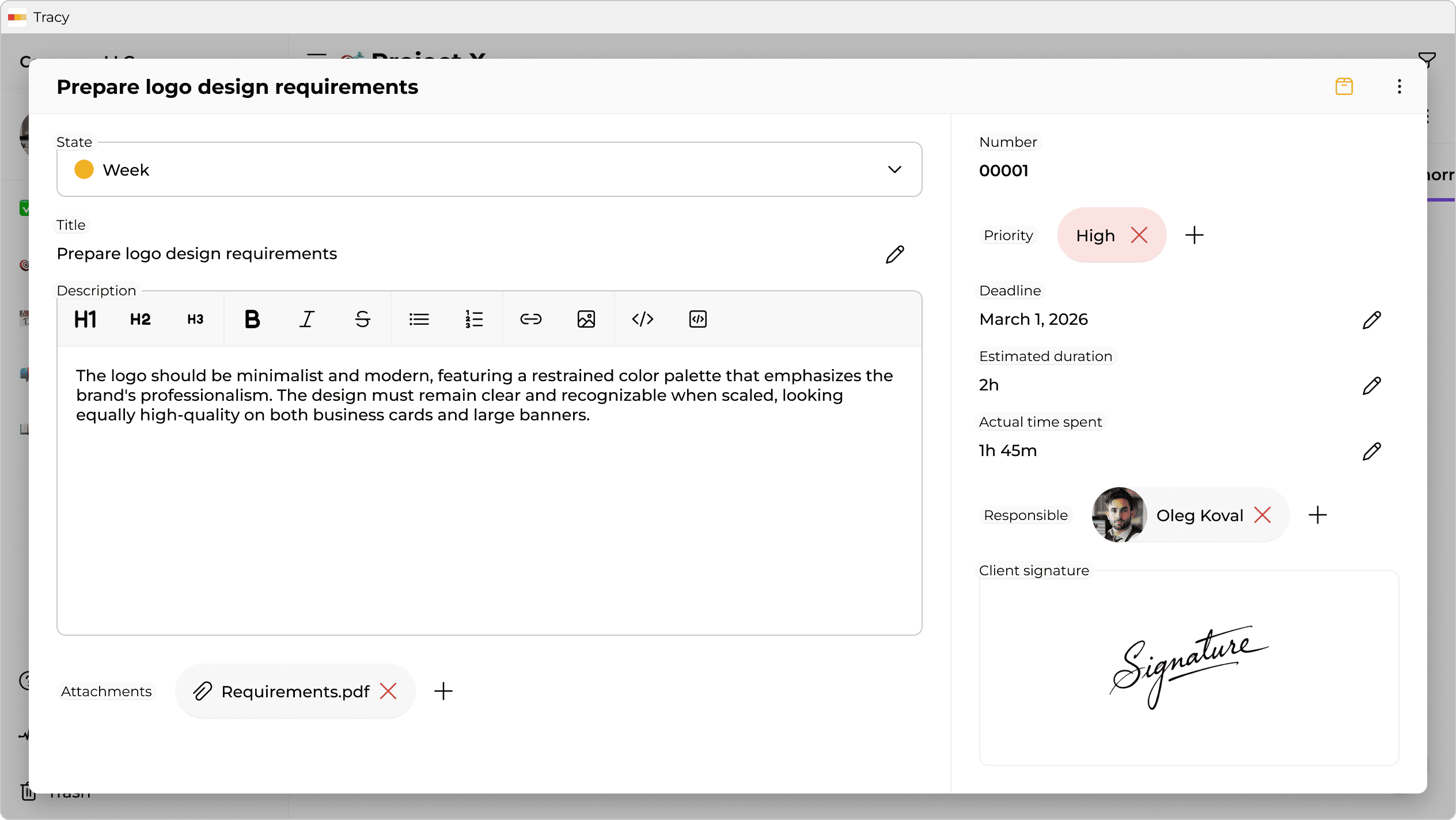
This is the single source of truth. No file versions scattered across inboxes—no more information chaos. Only one up-to-date project state visible to all participants—each with their own access rights. Amplitude experts perfectly capture the main benefit here: “When everyone looks at the same numbers, debates shift from ‘Whose data is right?’ to ‘What does this data tell us?’”.
Scenario 1. Managing Expectations: the “Smart Project Showcase”
The biggest fear when opening access to clients is exposing the “internal kitchen”: drafts, bugs, internal developer debates, or real production costs. Modern systems allow granular visibility—showing only selected parts of the data.
Fixed Price Model
When working for a fixed fee, clients care about the result (Done), not the process. They don’t need to know that a $500 task took a senior developer 30 minutes—or that it required ten failed attempts to fix bugs. Both can create a subjective feeling of overpayment.
How guest access works here: You give clients access to the project board where privacy settings automatically hide fields like “Actual Time Spent”, “Internal Comments”, and technical subtasks. They see card movement and clear progress without diving into internal economics or micromanagement.
Time & Material Model
Here the situation is the opposite. Clients pay for hours, so any opacity raises suspicion.
How it works: You grant access to time reports. The client can check anytime: “Yesterday the designer worked 3 hours and the frontend developer 4”, and on exactly what. This removes the need for exhausting end-of-month reports—billing becomes visible in real time.
Scenario 2. Legal Safety: Order Cards and Digital Approval
Email and messengers are unreliable for approving important decisions. Messages can be deleted, edited, or misunderstood. Guest access turns your CRM into a legal record-keeping tool.
Instead of exchanging files, the manager creates an order card (or estimate) in the system with all items, materials, deadlines, and the final amount. The client receives a read-only link—unable to accidentally change prices or delete lines.
At the bottom is an Approve button or a signature field (literally drawn on screen). Once approved, the system:
- Locks the document (snapshot).
- Records the date, time, and signer.
- Automatically updates the project status to “Approved”.
If a dispute arises later (“I ordered a different color!”), you simply open the signed order. It’s a solid argument.
Scenario 3. Structuring Chaos: Public Forms and Briefs
Projects often stall at the very start because tasks arrive as voice messages, missing files, or incomplete requirements. Managers then waste time collecting and transferring everything manually. When the client and the team exist in separate spaces, so-called data silos are formed. As Zendesk analysts emphasize: “Data silos are problematic because they reduce collaboration and transparency, create team barriers and decrease productivity”.
Guest access in this scenario can be implemented as public forms—essentially a part of your CRM exposed externally.
How it works: You send a client a brief’s link. This isn’t a Google Form—it’s a native task-creation interface inside your CRM. When the client fills in fields (“Service Type”, “Budget”, “References”) and clicks Submit:
- A request card is instantly created.
- It lands in the correct column (e.g., “Incoming Leads”).
- All fields are filled and a responsible person is assigned.
This saves managers time at project launch and guarantees nothing is lost during copy-paste transfers.
Scenario 4. “Last Mile” Security: Couriers and Contractors
Temporary staff and external contractors need access to perform tasks—but you can’t risk exposing your full client database. According to an IBM report, the global average cost of a data breach is now $4.45 million, and the lion's share of these incidents occurs precisely because of excessive or misconfigured access permissions.
Example: a furniture delivery courier needs the address, phone number, and list of boxes. They must not see purchase history, client status, internal notes, or total order value.
Solution: role-based interfaces.
You configure the system so the “Courier Service” role sees a stripped-down order card—only 3–4 necessary fields. They can mark “Delivered” or upload a photo report but have zero access to other system sections.
Architectural Approaches: How Different Tools Handle Guest Access
When choosing a system, it’s crucial to understand how access rights are implemented. Different platforms use different models—each with trade-offs.
Synchronization Model (Monday.com)
Monday.com offers strong visualization, but access is often board-level rather than field-level (column permissions exist but are UI-controlled and risky for sensitive data).
To show progress while hiding budgets or technical details, users often duplicate boards:
- An internal board with full data.
- A client board with limited columns.
- Automation syncing statuses between them.
Downside: workable but complex. If automation breaks, clients may see outdated data. It also doubles data volume.
Open Board Model (Trello)
Trello prioritizes simplicity and transparency. Granting access typically exposes everything: cards, attachments, checklists, and comments.
This works for small trusted teams but becomes limiting with external clients (more on the key differences between these architectures in the article “Tracy vs Trello: What Is Better for Small Business?”).
Result: teams often move internal discussions to messengers, fragmenting context—tasks live in Trello while real conversations happen elsewhere.
Single Object Model (Tracy)
The approach we implemented in Tracy is based on field-level security.
There are no duplicated tasks. A card exists once, but the system dynamically adapts what each role sees:
- Managers see all 20 fields—including finances and time tracking
- Clients opening the same link see only permitted fields—for example, description, status, and result
Advantage: data integrity. Clients always see live information without extra syncs or integrations.
Conclusion
Guest access is not about handing clients the keys to your entire office. It’s about building transparent walls where trust is needed—and secure vaults where protection matters.
Implementing this approach elevates customer service to a new level. Clients see openness, professionalism, and confidence. And you gain peace of mind knowing that every process—from brief to final approval—happens inside one secure ecosystem.
 Dmytro Sikorskyi