How to Set Up a CRM for a Small Business Without Technical Knowledge
Every growing business eventually reaches a certain point. You’re still managing—with spreadsheets, messengers, and notes—but you start feeling that something is getting lost. An order that was forgotten. A client who never got a call back. An agreement that stayed in someone’s personal inbox. This is the moment when CRM stops being “a useful tool for big companies” and becomes a real necessity.
But two practical problems immediately arise. The first is choosing a tool: the market is flooded with solutions, and it’s not easy to understand which one is right for you. The second is how to properly understand your own processes and transfer them into a system so that it actually works instead of turning into just another empty dashboard. If you’re not yet fully clear on the difference between a CRM, an ERP, and a task manager, it’s worth first reading this article that explains it all clearly.
We won’t talk about choosing a specific tool in this article—that’s a separate topic, and everyone selects one according to their tasks and budget. There’s also a separate piece about CRM systems for service businesses if that’s your case. Here, we’ll focus on something else: how to set up a system from scratch so that it reflects the real business. We’ll demonstrate using Tracy as an example—but the logic and steps will be the same for any flexible CRM tool.
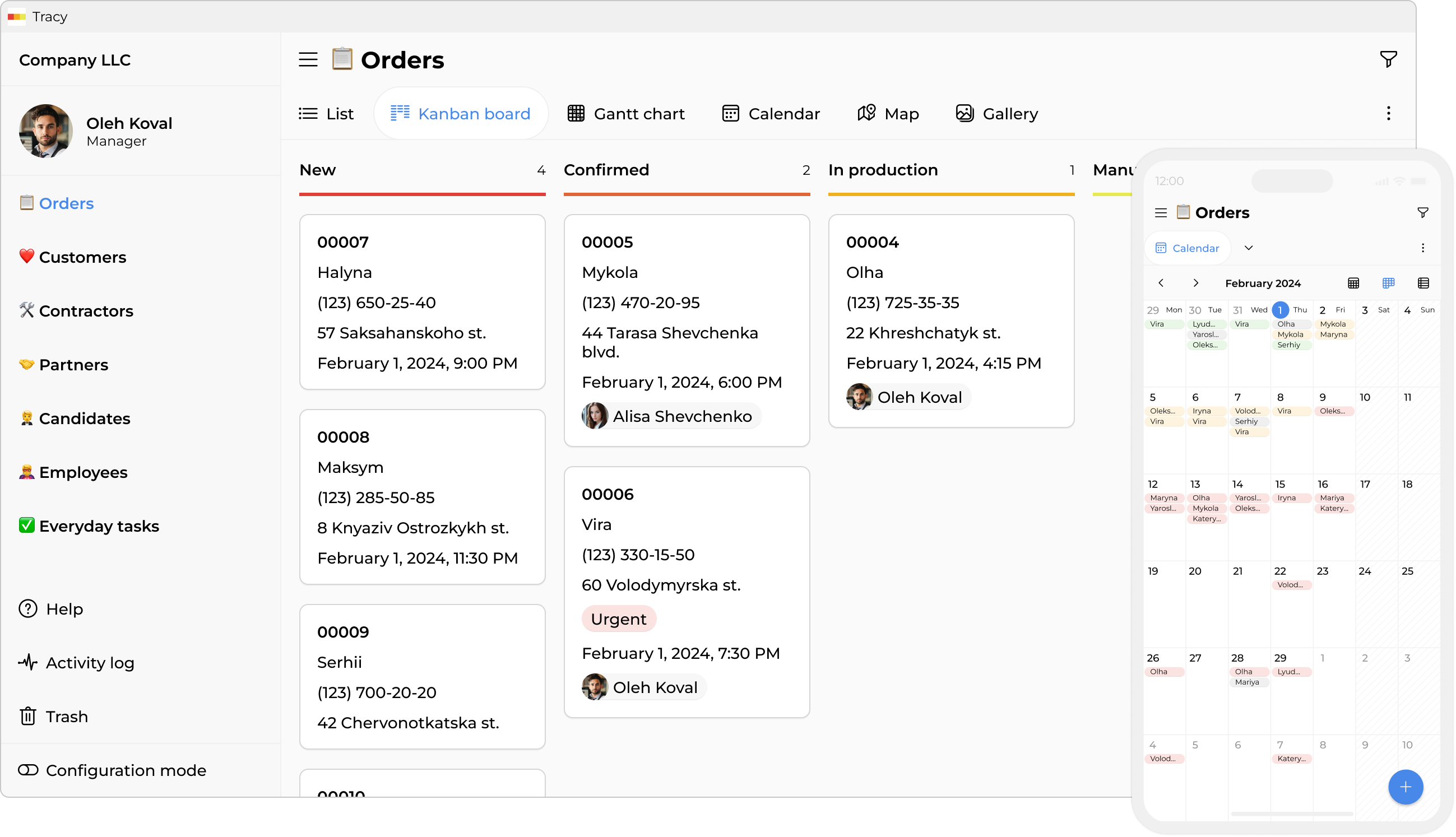
Step 1. Start with Structure, Not the Interface
The first thing you’ll see when registering in Tracy is a suggestion to choose a template. A template is simply a starting point. Even if it doesn’t match your business 100%, adapting an existing structure is always easier than building everything from scratch.
Choose the closest option in terms of meaning. If you produce custom cakes, a manufacturing template will work. If you provide services, a service company template will be more appropriate. What matters isn’t that the template matches perfectly, but that it reflects the main logic: there is something that moves from point A to point B, and there are people responsible for it.
Step 2. Understand Your Processes Before Configuring Them
This is the most important step, and most people skip it. Before touching any settings, sit down and write out—even on a sheet of paper—how an order or project actually moves through your business.
Questions worth asking yourself:
- How does work begin? A phone call, a request, a message, a meeting?
- What clear stages exist between “received the request” and “closed the order”?
- What information is needed at each stage—and by whom?
- Who gets involved and when? Where does responsibility transfer?
- Where do things currently get lost or require unnecessary clarification?
Let’s look at a concrete example. Imagine a pastry shop that makes custom cakes. A typical process might look like this:
- A client writes via Instagram or through the website. The manager responds and clarifies details—date, flavor, decoration complexity, preferences, and the client’s contact information.
- After the details are confirmed, an invoice is issued. The client pays a deposit.
- The order is passed to the pastry chef. If decoration from an artist is needed, there’s another handoff.
- The finished cake is photographed, approved with the client (if necessary), and packaged.
- Pickup or delivery takes place. Final payment is made.
- After completion, a review request is sent and the card is archived.
Each of these stages becomes a status in Tracy. Each clarification (“order date and time”, “weight”, “dietary restrictions”, “amount”, “photo”, etc.) becomes a property of the card. Each person on the team becomes a user with a specific role and access level.
Step 3. Think About Access and Roles Before Inviting People
One of the common mistakes when implementing a CRM is configuring access at the very end or thinking “we’ll figure it out later”. This often leads to situations where everyone sees information they don’t need—or, on the contrary, cannot see the information required for their work.
Tracy allows flexible access control at several levels: by team role, by card status, and by assignment to specific cards. This means you can configure the system so that a pastry chef only sees orders assigned to them and only the fields they need—without access to invoices, client contacts, or correspondence.
A few practical principles:
- Everyone should receive the minimum necessary level of access—no more.
- The administrator or owner sees everything. Others see only their part.
- If a contractor or courier is involved only at one stage, they shouldn’t have access to the entire system. Guest access to specific cards is enough.
- If clients need to submit requests or confirm details, you can configure external access to certain forms without requiring system registration.
A well-designed access structure solves several problems at once: it reduces the risk of accidental changes, simplifies onboarding for new employees (no need to explain “what is allowed and what isn’t”), and protects sensitive data from unnecessary visibility.
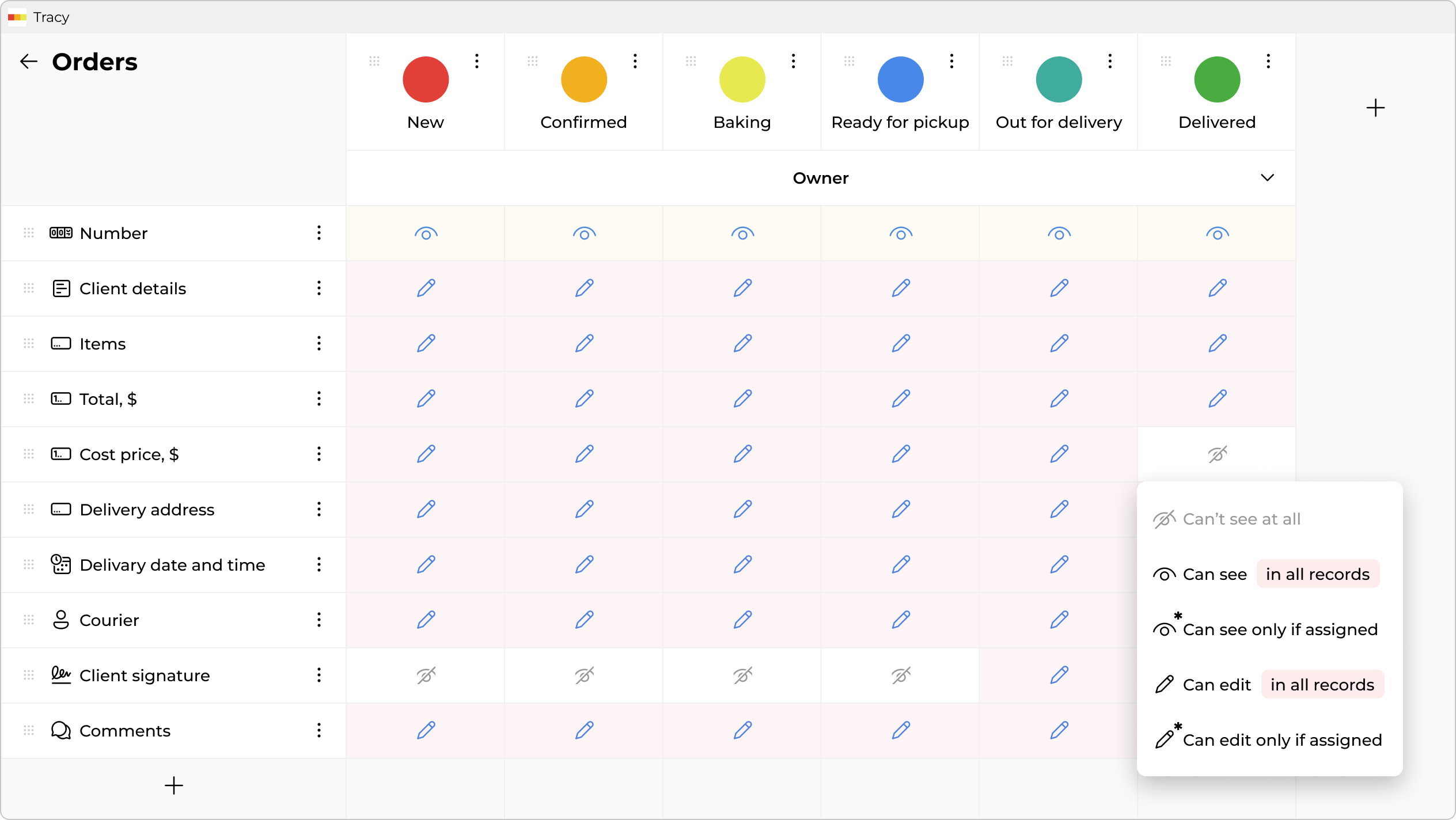
Step 4. Adapt the Template to Reality
Now that you understand your processes and have a clear idea of roles, you can move on to configuration.
Datasets
Take a close look at the data sets (the main sections in the sidebar) already included in the template. A typical structure for a small production business might include orders, clients, and tasks.
You might need to add suppliers or contractors—or influencers and a content plan for marketing activities. Remove (or hide for later) anything unrelated to your business. Extra data sets complicate work and confuse the team.
Statuses or Stages
Statuses represent the movement of a card from start to finish. Review the existing ones and edit them to match your process. For a pastry shop, this might be:
“New Order” → “Confirmed” → “In Progress” → “Ready” → “Delivered / Picked Up” → “Closed”.
Important: don’t try to cover every possible scenario immediately. Start with the main flow.
Properties
Properties are the card fields: text, numbers, dates, lists, and links to other cards.
For a cake order, this might include: order date, delivery date, flavors, complexity, weight, amount, responsible pastry chef, courier.
For a client card: name, contact information, communication channel, and notes.
Don’t add fields “just in case”. Extra fields mean extra work every time data is entered. Adding a new field later is easy; removing a field that has already been used is psychologically harder.
The detailed mechanics of how this is configured in Tracy are described in the “How It Works” section—here we intentionally focus on the logic and algorithm rather than the clicks.
Step 5. Invite the Team and Launch a Pilot
When the basic structure is ready, don’t launch the system for everyone and everything at once. Start with a pilot project: one order or project managed entirely through the CRM from beginning to end.
CRM implementation always creates some stress for the team. People are used to their ways of working, even if those ways are imperfect. A new system means new habits, new responsibilities, and sometimes a feeling of increased control or distrust. This is normal.
That’s why the process must be transparent at every step. Explain to the team why the need arose, what specific problems it solves, how their work will change, and what will remain the same. Changes should be inevitable—but gradual. More about minimizing team resistance during change can be found in this article.
Practical tips for the first launch:
- Invite first those who are open to new tools—internal “champions”.
- Conduct a short introduction: not an hour-long training, but a 15-minute overview of the main workflow.
- Agree that the first month is a test, not the final version. All feedback is welcome.
- New orders can be entered into the system immediately, while existing ones are finished using the old process.
Step 6. Collect Feedback and Improve
The first pilot order or project isn’t just a system test—it’s a feedback collection. Inevitably, you’ll discover things you didn’t think about: a missing field, a stage that’s hard to find, an action that takes three clicks instead of one.
This doesn’t mean the system is bad or something was done incorrectly. It’s a normal part of implementation. Studies show that most CRM implementation problems are not technical but organizational—such as employee resistance, insufficient training, or lack of engagement.
Collect feedback in a structured way—for example, using a separate card or table—and regularly make adjustments.
Gradually expand the scope: another order, another process, another department. Within a month or two, the system will reflect the real business rather than the ideal model that existed in your head at the beginning.
What Else the System Can Offer—Room for Growth
Once the core processes are established, CRM opens opportunities you might not have considered initially.
For example, time tracking. If each team member records how much time they spend on an order, you get the real cost price—not an estimate, but an accurate number. This is especially important in service businesses, where pricing is often based on intuition rather than data. This topic is covered in detail in the article about timesheets and hidden losses.
Then there’s analytics: how many orders per month, the average order value, where cards get stuck the longest, which manager handles the most clients, which pastry chef produces the fewest revisions. All of this appears automatically once data is consistently entered into the system.
Another level is automation: reminders when statuses change, automatic assignment of responsible people under certain conditions, notifications to clients when their order is ready. These are things you think about “later”, but when the time comes, they can be implemented quickly.
And finally—scaling. When the business grows and new directions, order types, or teams appear, the system is already there. You’re not building from scratch—you’re expanding what already works.
The Main Idea
A CRM is not something you simply configure—it’s something you grow.
You start with a simple structure that reflects real processes. You launch a pilot. You collect feedback. You improve. Gradually, the system becomes a tool that is genuinely convenient to use—rather than another service that costs time and money but that no one opens.
Technical knowledge isn’t required for this. What you need is the willingness to spend time understanding your own business—and consistency in implementation.
 Dmytro Sikorskyi