Airtable or Tracy: Which to Choose for a Small Service Business
Most operational businesses start with Excel or Google Sheets—and at some point hit the same limitations: copy-pasting courier addresses into Telegram, completion photos scattered in a group chat with no link to the order, clients calling to ask “where is my technician?” or “has my payment been confirmed?”. Tasks without tracking become a source of disputes. Decisions are made “by gut feeling” because there’s no analytics. The real cost of a service is unknown because no one tracks time.
All of this is solved by a system. The question is—which one.
You’ve heard of Airtable. You may have even tried it. It looks like a smart spreadsheet—and that’s true. But if you have managers, technicians, couriers, clients, and all of this runs daily—let’s figure out whether Airtable is really for you, or whether there’s a simpler path.
What Is Airtable and Where It Actually Shines
Airtable is a smart database with a spreadsheet-like interface. You can build complex relational structures, link tables to each other, create custom views and automations. For people who think in terms of databases, it’s a very powerful tool.
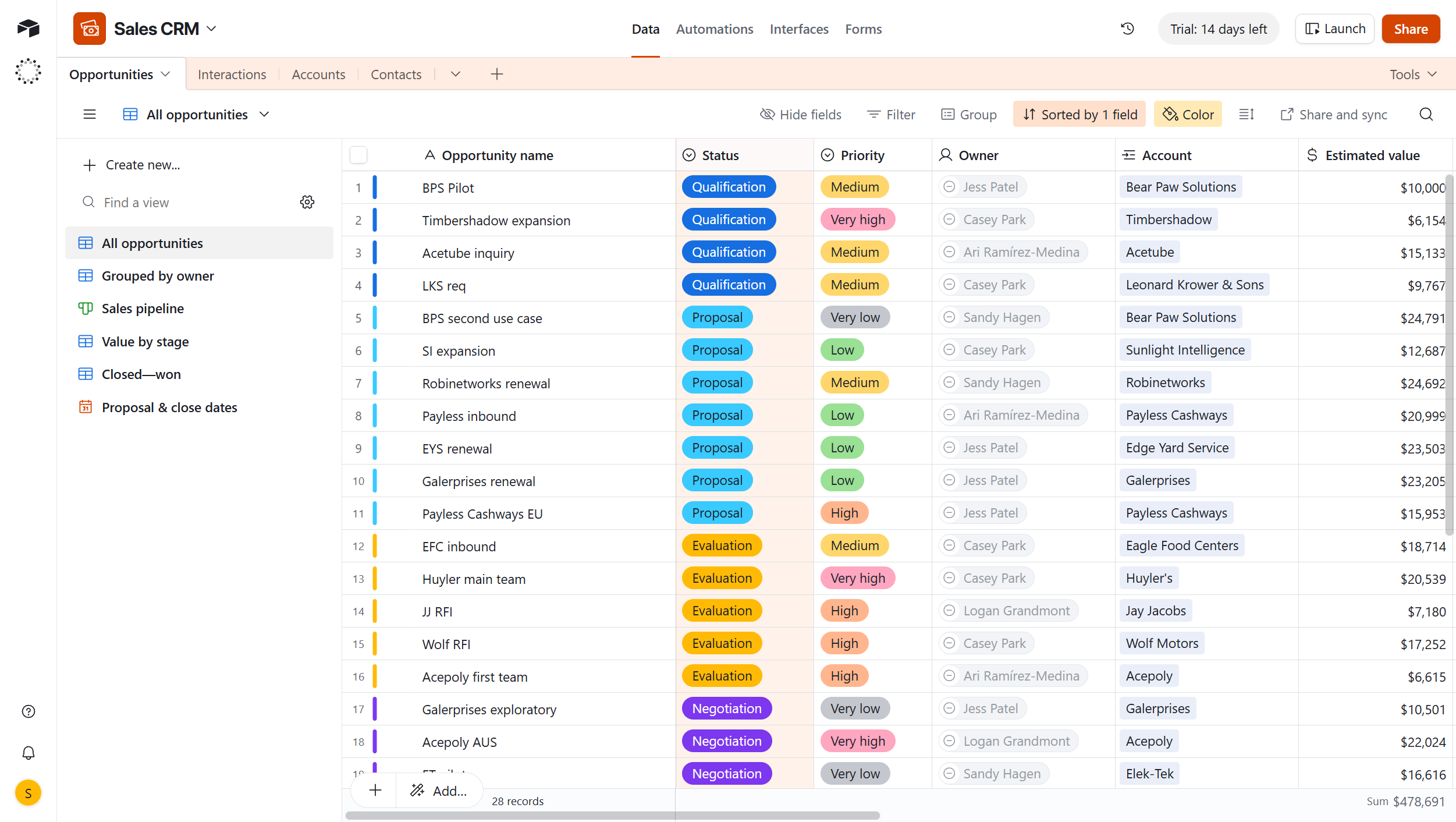
Airtable works well when:
- you need a flexible data structure with links between tables;
- the team is small, technically literate, and ready to configure everything themselves;
- processes are unique and no ready-made template fits;
- the main goal is storing and structuring information, not managing a workflow;
- you need a large number of out-of-the-box integrations.
It’s a tool for people who love building systems. If you have such a person on your team—Airtable can be very useful.
Where Airtable Falls Short for Operational Businesses
Pricing That Grows With Your Team
In 2025, Airtable significantly raised its prices: the Team plan now costs $20 per user per month (up from $12 in 2023), and the Business plan costs $45 per user per month. For a team of 8 on the Team plan, that’s $160 per month just for the subscription.
The most common complaint about Airtable is the per-user billing model. You have a courier or technician who only needs to view their address and tap “Done”—but you still have to pay for them like a full editor. Or you need to build a separate interface, which takes additional setup time.
Two Steps Instead of One
Both in Airtable and in Tracy, you first need to think through the structure and then build it. This is common to any no-code builder. But the difference is in how many steps it takes.
In Airtable, you first design the data structure—tables, fields, relationships between them. Then you separately build interfaces for different roles: one view for the manager, another for the courier, a third for the client. Each interface is a separate object with its own logic. This gives more flexibility but requires significantly more time and technical understanding.
In Tracy, you configure an order card right away—and in that same moment you define the data structure (which fields exist), the layout for each role (what each role sees), and access rights (who can edit what at which stage). One step instead of three. Less flexible compared to Airtable, but for most operational businesses this level of flexibility is more than enough.
Access Rights—Powerful but Complex and Not on All Plans
In Airtable, you can build a separate interface for a courier where they only see their own assignments. But there are significant limitations:
- detailed permission management at the interface level is only available on Business and Enterprise Scale plans;
- each such role-specific interface is a separately built object with its own display logic;
- there is no built-in binding to order stage: if a field is open to a manager, it’s open at all times—regardless of which stage the order is at.
The key Airtable limitation: you cannot set access permissions for a specific part of the database—only for the entire workspace or entire database. Fine-grained access control requires either the Interface Designer (expensive and labor-intensive) or workarounds.
Tracy: The Same Flexibility, Built for Operational Businesses
Tracy is not a “simplified Airtable”. It’s a different approach to the same problem. Airtable has templates, but they’re mostly for marketing, HR, content planning, and sales. A template for a cleaning company or field service business needs to be built from scratch or found in the community. Tracy, by contrast, starts with operational processes: there are ready-made templates for cleaning, field service, repair, and delivery—and they already include the right stages, fields, and basic access rights.
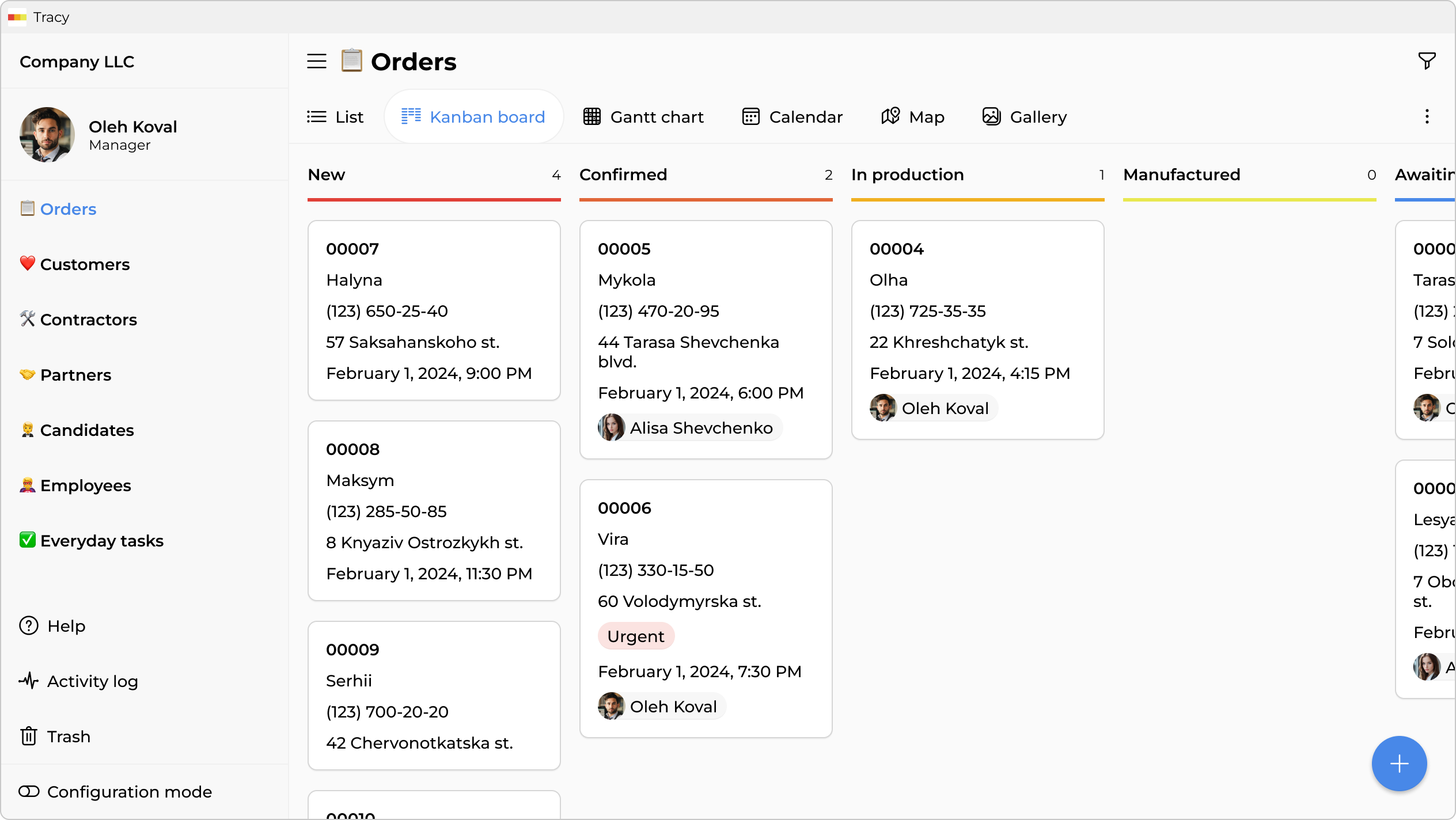
Cards, Stages, and 25+ Field Types
Every order is a card. It moves through stages you define: “New Request” → “Technician Assigned” → “In Progress” → “Completed” → “Closed”. The card includes 25+ field types: text, numbers, dropdowns, checklists, files, photos, geolocation, barcodes, comments, time timers, and more.
Airtable also supports many field types. The difference is that in Tracy you build the card directly, rather than first building a database and then building interfaces on top.
Permissions Tied to Both Role and Stage
This is the key distinction. In Tracy, permissions work in two dimensions: role (owner, manager, technician, client) and stage (which step the order is at).
Take an example from a water filtration system maintenance company (exactly the case where the client needs a regular filter cartridge replacement and it’s important not to lose track of it):
| Field | Owner | Manager | Technician | Client (guest) |
|---|---|---|---|---|
| Name & address | ✓ edits | ✓ edits | ✓ views | ✓ views |
| Filter type & replacement date | ✓ edits | ✓ edits | ✓ views | ✓ views |
| Replacement cost | ✓ edits | ✓ views | — | — |
| Cost price & margin | ✓ edits | — | — | — |
| Manager’s comment | ✓ edits | ✓ edits | — | — |
| Before & after photos | ✓ views | ✓ views | ✓ uploads | ✓ views |
| Payment status | ✓ edits | ✓ views | — | ✓ views |
| Work time timer | ✓ views | ✓ views | ✓ starts | — |
| Next service date | ✓ edits | ✓ edits | ✓ views | ✓ views |
Moreover, once an order moves to the “Closed” stage, the manager can no longer edit the card—automatically, with no additional setup. Airtable has no such dynamic stage-binding.
Mobile App Without the Clutter
A technician opens their phone and sees: two orders for today. The address, what to do, a button to upload result photos, and an option to mark as “Done”. Nothing extra.
A courier gets the delivery address directly in the app—without anyone copying data into Telegram or granting access to the entire file.
Guest Access for Clients—One Link
The client receives a link to their card. They see: status (“technician is on the way”), technician’s name, photos after completion, payment status. Nothing else. No need to register, no need to understand how the system works.
This approach eliminates calls asking “where is my technician?” and “has my payment been confirmed?”—the client sees everything themselves.
Comparison by Key Parameters
| Parameter | Airtable | Tracy |
|---|---|---|
| Field-level access | Available from Business plan only; no stage-binding | Built-in, tied to role and stage |
| Guest access | Via Interface Designer; more complex to set up | Card link with selected fields, ready immediately |
| Time tracking per order | Must be configured separately | Built-in time log |
| Automated client reminders | Via automations; must be built | Built-in automation by stage |
| Mobile app for field staff | Full interface; complex for non-technical users | Only what’s needed for the role |
| Ready templates for service businesses | Templates exist but are generic | Templates for cleaning, repair, delivery, service |
| Price for 8 users | ~$160/mo (Team) | $49/mo (Medium, up to 12 users) |
| Record limit | 50,000 (Team) | 50,000 (Medium) |
| Field types | 20+ | 25+ |
| Time to launch | From one week | From one day |
Summary: Who Should Use What
Airtable is a good fit if:
- you have a technical person who loves building systems;
- you need a large number of out-of-the-box integrations with other systems;
- your processes are unique and no ready-made template works;
- you need complex relational links between databases;
- the team is small and strict role-based control is not necessary.
Tracy is a good fit if:
- you run an operational business: cleaning, repair, delivery, field service;
- you have different roles with different levels of access to information;
- field staff should only see what’s theirs and only what’s needed;
- it’s important for clients to see their order status without extra calls;
- you need time tracking to understand real service costs;
- it’s important that onboarding new employees takes minimal time.
Frequently Asked Questions
Can Airtable Show a Technician Only Their Own Orders?
Yes, through the Interface Designer—you can create a view where a person only sees records where they are assigned as the executor. But this is a separately built interface, available from the Team plan. Additionally, a person who can edit records counts as a paid “editor” even if they edit one field once a day.
In Tracy, this logic is simpler to configure.
Does Airtable Support Link-Based Access for Clients?
Yes—you can share a link to a specific record or create an interface with public access. But the client will see all fields that haven’t been manually hidden. Building a personalized “client view” with selected fields is an Interface Designer task and requires additional configuration.
In Tracy, the client receives a link to their card and sees exactly what you’ve allowed: status, technician’s name, photos, date. Everything else is hidden from them.
Is Airtable Expensive for a Small Team?
It depends on the team. If you have 3–4 technically literate people who all work with the system equally—$20/person may be justified. But if you have 2 managers and 6 technicians who only update statuses and upload photos—paying for 8 full editors gets expensive.
Tracy charges per account, not per user: the Medium plan at $49/month includes up to 12 users.
Can Tracy Replace the Excel or Google Sheets Files Used to Manage Orders?
Yes, this is one of the most common migration scenarios. Tracy has ready-made templates for cleaning, field service, repair, and logistics—they already include the right stages, fields, and basic access settings. Most teams migrating from Google Sheets are up and running in a single day.
How Do You Solve the “Someone Is Waiting for Someone and Nobody Knows” Problem?
In Tracy, a card always shows the current stage and the person responsible. If an order stays at a stage longer than set—automation sends a notification to the manager. There’s no need to ask “where is this order” or “why is it still in progress”—the system shows it automatically.
How Does Tracy Solve the Real Service Cost Problem?
Technicians can log the actual time spent on an order. All data feeds into analytics: time per order, time per client, efficiency per technician. This lets you see which clients or order types are actually unprofitable—and make decisions based on facts, not gut feeling.
 Dmytro Sikorskyi